

QR Code Table Tent for Collecting Reviews: We Make It for Free
Share
Save
Guests are happy to leave reviews when it is easy and when someone asks them to. For businesses listed on Madloba we make a table tent with QR codes: a guest points a phone camera at it and lands right on the review page for your venue on Madloba.info or Google Maps. We prepare the tent for free, all you need to do is print it and put it on the table.
What the table tent is
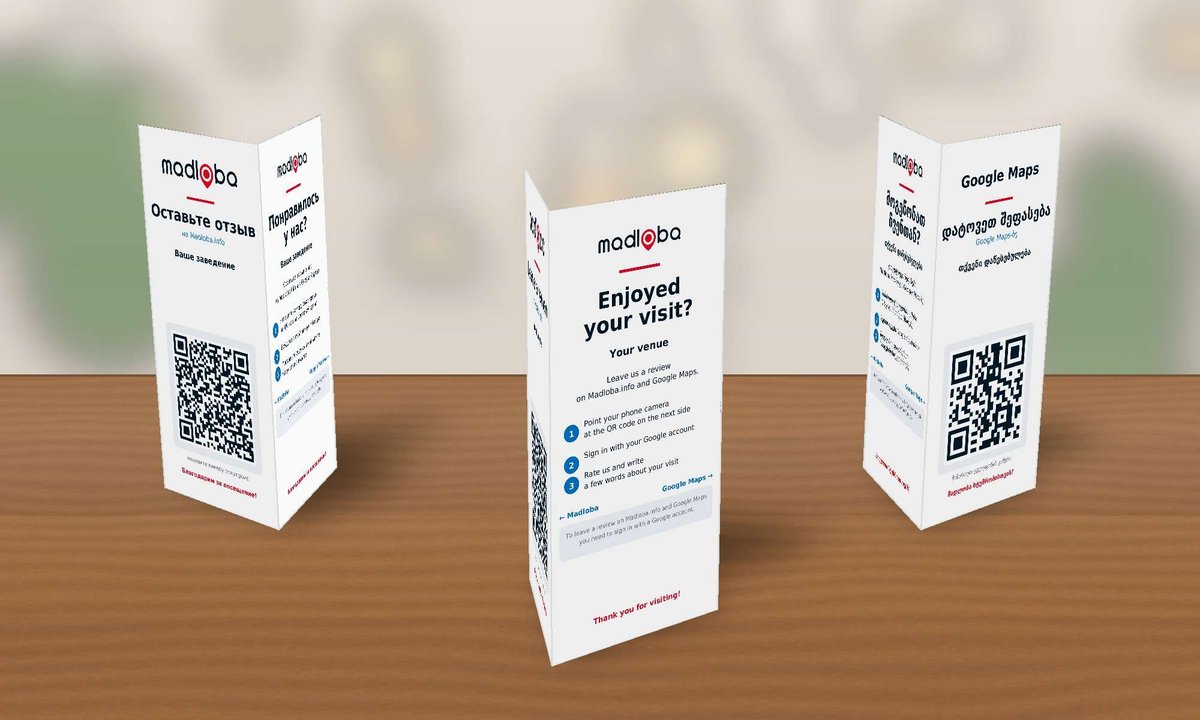
It is a three-sided tent folded from one A4 sheet. It stands on a table, a counter or next to the till, and each side faces a different way, so guests can see it from anywhere.
- Side one: the Madloba logo and a QR code for a review of your venue on Madloba.info. It opens the reviews section of your listing directly.
- Side two: a short note for guests: point the camera, sign in with Google and leave a review.
- Side three: a QR code for a review of your venue on Google Maps.
The tent shows the name of your venue. You choose the language: English, Russian or Georgian. The whole tent is printed in one language, so the text stays large and easy to read from a distance.
Why it helps
You get more reviews. Most happy guests leave without writing anything, not because they did not like it, but because a review simply does not cross their mind. The tent reminds them at the right moment, while the impression is fresh.
Reviews help people find you. New guests read recent reviews to decide whether to come. This applies both to your Madloba listing and to your Google Maps profile.
Guests do not have to search. If people have to look for a review link, they usually do not write a review. The QR code removes that step.
How a guest leaves a review
- Points the phone camera at the Madloba or Google Maps QR code.
- Signs in with a Google account. Reviews on both Madloba.info and Google Maps require a Google sign-in.
- Gives a rating and writes a few words about the visit.
Reviews on Madloba.info are published after a check against our rules. Read more in our Review Moderation Policy on Madloba.info.
A table tent with your own middle panel
The middle panel can be given over to your business. We will put there what you want guests to see: QR codes for your website, social media or menu and a couple of lines about you. The guest note then moves to a short line under the QR codes on sides one and three.
Free with Premium. If your listing is on the Premium plan, we make the tent with your own middle panel at no extra cost.
Without Premium: 29 GEL. This is the price of preparing a tent with your own middle panel. As with the free tent, printing is on you. After your request we will send an invoice, and after payment the ready file.
To order, choose “With Premium” or “Without Premium” in the form below and tell us what to put on the middle panel.
How to get a table tent
Fill in the form below. We need the name of your venue, the link to your Madloba.info listing and the email to send the file to. The Google Maps link is optional, we can find your venue ourselves.
Within two working days we will email you a print-ready PDF and a separate A4 guide on how to print the tent, fold it and where to put it.
Where to find your listing link. Open your listing on madloba.info and copy the address from the browser bar.
Where to find your Google review link. Open your Google Business Profile and click “Ask for reviews”: Google will show a ready short link.
If the form does not open, email [email protected] with the subject “Review table tent”. If your business is not yet listed on Madloba, add it first. It is free as well.
How to print and fold it
- Print in colour on thick paper, 160–250 g/m². A print shop or copy centre is the easiest option.
- Use 100 % scale, not “fit to page”, otherwise the QR codes get smaller.
- Fold the sheet along the three dotted lines and glue the narrow “Glue here” flap to the inside of the first side.
- Before putting the tents on tables, test both codes with your own phone.
A table tent gets dirty faster than a menu. Keep a few spare prints or place the sheet in a clear acrylic tent holder.
How to ask for a review
Ask for an honest review, not for five stars. “If you enjoyed your visit, please leave us a review, the code is on the table” works better than “please give us five stars”.
Do not offer a discount or a gift for a review. Rewarding ratings breaks the rules of both Madloba and Google, and such reviews get removed.
Do not write reviews on behalf of guests. We explain why it backfires in Why Real Reviews Matter More Than Fake Ones.
Reply to reviews. When guests see that reviews are read, they write more willingly. See our practical guide for business owners.
Frequently asked questions
Yes, the standard tent is free, you only pay for printing. Only a tent with your own middle panel without Premium is paid: 29 GEL.
Reviews on Madloba.info and Google Maps are left separately and are not transferred between the two platforms automatically. Guests choose where it is easier for them, and you get reviews on both.
One tent is always in one language. If you have many tourists, send two requests, for example Georgian and English, and put the tents on different tables.
The code leads to your Madloba listing. If the listing address has changed, send a new request and we will send a new tent.
Share
Save
Read also
How to Respond to Reviews: A Practical Guide for Business Owners
💼 A practical guide for business owners: how to respond to positive, neutral, and negative reviews on Madloba.info.
Why Real Reviews Matter More Than Fake Ones
📍 Why fake reviews damage business and how to get genuine reviews from clients on Madloba.info. A practical guide for businesses in Georgia.
What to Do If a Client Left a False or Fake Review
📍 What to do if your Madloba.info listing has received a false or fake review. How to submit a review investigation request and what the editorial team can do.
Review Moderation Policy on Madloba.info
📍 Which reviews we publish, which we remove, and why. Madloba.info's transparent moderation policy, built on the open standards of Google and Yandex.
If I purchase a premium plan, will you remove a negative customer review?
📍 Find out if Madloba Info deletes negative reviews when you purchase a premium plan and learn the best way to handle negative customer feedback.
I wrote a review, but it wasn't published. Why did this happen?
📍 Discover possible reasons why your review wasn't approved on Madloba Info and how to address the issue.
0 comments
Log in to leave a comment