





How to use stories in Yandex Maps? We analyze how they help attract customers and increase sales.
Stories in Yandex Maps – a new format for attracting customers! We will analyze how to add them, set them up and use them to increase sales.
🚀 How to make your business visible and attract new clients?
Yandex Maps has launched a new format – Stories, which help companies stand out from the competition. Now entrepreneurs can share promotions, updates, advantages, and most importantly – show how to get to their establishment! By the way, Yandex Maps is constantly evolving and delights with other useful updates that help companies attract more customers.
But how to use this tool correctly so that it really attracts customers, and is not just a profile decoration? In this article, we will analyze how stories work, what mistakes companies make and how to get the most out of it.
💡 Need help promoting your business? Sign up for a consultation!
We will analyze your profile and give you recommendations on how to increase visibility and conversion.
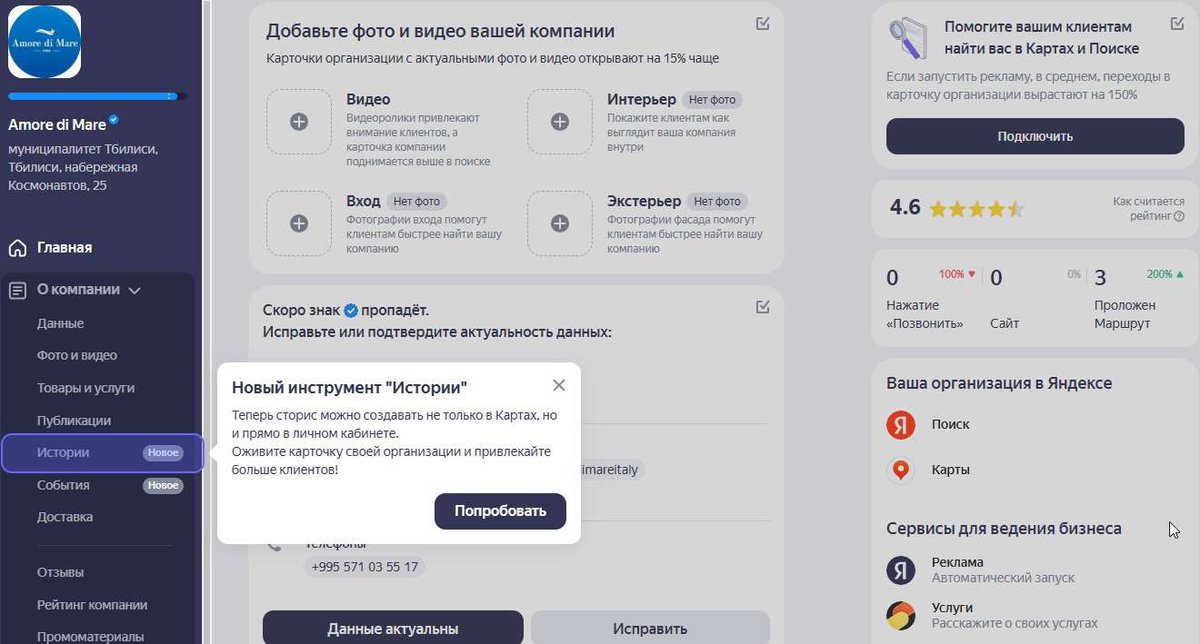
📢 What are stories on Yandex Maps?
Yandex Business has added the Stories feature, similar to Instagram Stories, but with one key difference - they work as a long-term promotion tool.
🔹 Companies can upload up to 10 photos or slides per story.
🔹 Stories are moderated and appear on the business card.
🔹 They help present promotions, new products, and useful information.
🔹 The most important thing is "How to get there": stories allow you to show customers the way to your office or store.
⏳ Stories remain in the profile, and do not disappear after 24 hours, as in social networks.
📌 Fact: cards with active stories receive 30% more clicks in Yandex search and maps.
🎯 How to add a story to Yandex Maps?
The process of adding a story in Yandex Business is very simple:
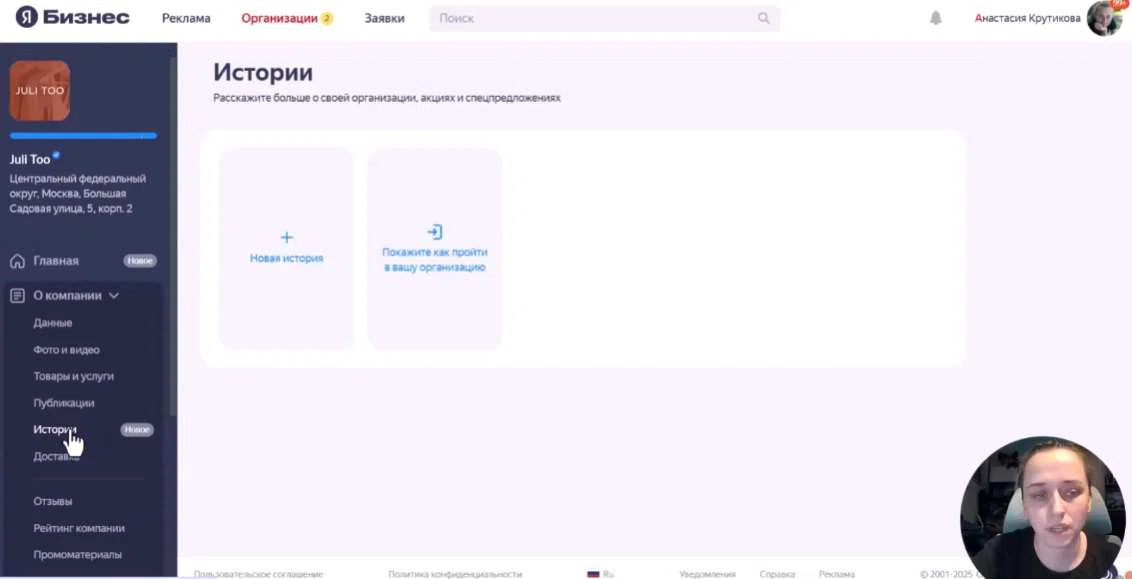
1️⃣ Open your Yandex Business account.
2️⃣ Go to the "Stories" section.
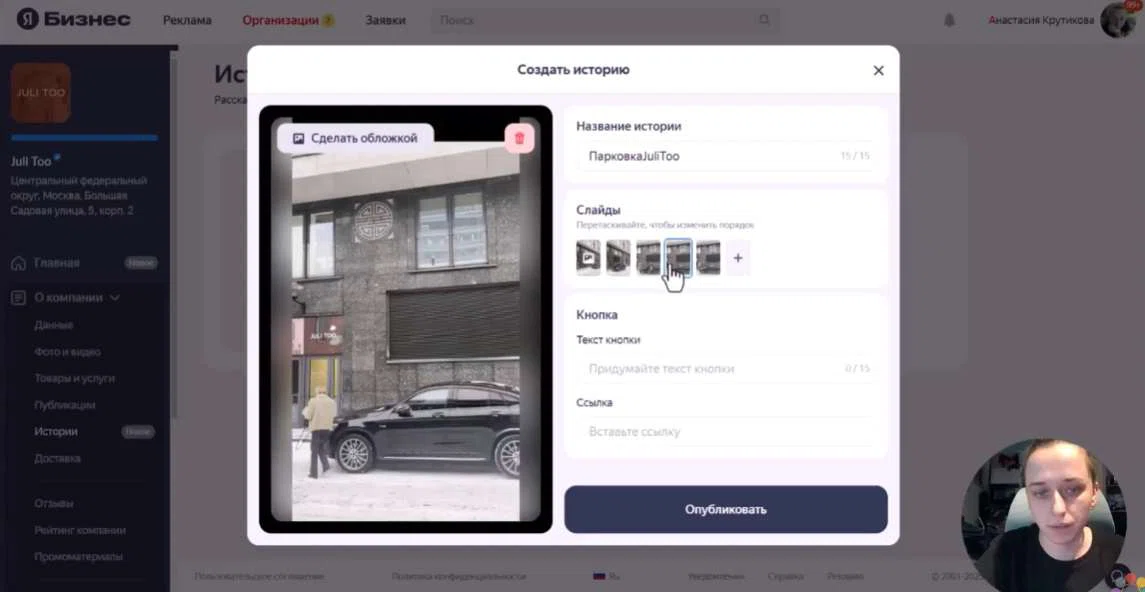
3️⃣ Click "Add a new story".
4️⃣ Upload images (up to 10 photos).
5️⃣ Come up with a short title (up to 15 characters).
6️⃣ Add a link to your website or social media.
7️⃣ Submit for moderation (takes 2–4 hours).
✅ Tip: Use real photos of your business, not stock images. Yandex ranks cards with live images better.
💡 Want to learn more about local promotion strategies?
Sign up for our course on promoting your business on maps – step-by-step instructions, secret life hacks and personal recommendations from experts!
📍 How to get there? Why is this an important feature?
One of the most useful features in stories is the "Directions" block.
🔥 Imagine the situation: you have an establishment in a courtyard, in a business center or in an area with difficult navigation. Customers can't find you - and simply go to competitors.
💡 The solution is to add a story with detailed photos of the route to your office.
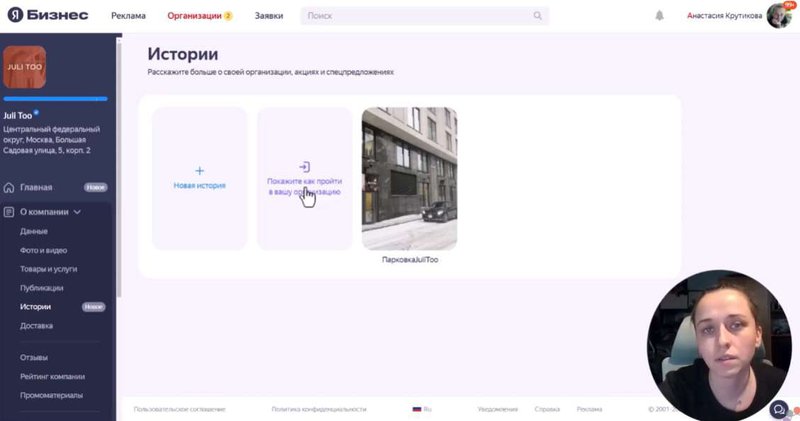
📌 How to download the "How to get there" story?
🔹 Upload step-by-step photos with the route.
🔹 Add brief explanations.
🔹 Provide a link to the site for convenience.
🔹 Send for moderation in Yandex.
📌 Fact: Companies that use stories with "How to get there" reduce the percentage of customer refusals by 20%!
💡 Is your card poorly designed and clients can't find you?
Leave a request for a free audit, and we will tell you how to correct errors!
🔥 Why are stories in Yandex Maps important for business?
📌 1. Make you stand out from your competitors
Stories are dynamic content that attracts customers' attention.
📌 2. Help customers find your business
The "Directions" feature reduces the number of bounces, as customers know exactly how to get to you.
📌 3. Increase trust
Live photos, real promotions and reviews make the company more attractive to customers.
📌 4. Increase conversion
Cards with active stories attract 30% more customers!

🚀 Stories on Yandex Maps are another way to attract customers!
✔ Share promotions and offers to interest your audience.
✔ Use "How to get there" to help customers find your business easily.
✔ Upload live photos - cards with high-quality images are ranked higher.
✔ Optimize your profile to get to the TOP of search results.
📢 Want more clients? We will help: set up a card, add stories, increase business visibility!
A rented website is another step towards success without development costs.
👉 Take action today! 🚀
Local SEO: How to Promote Your Business in Search?
-

How to improve visibility on Yandex Maps and Google: effective optimization for your business
Local business promotionFind out how to properly optimize your card on Yandex Maps and Google to attract more cus…
-

How to promote on maps for free? 2 key steps to success 🚀
Local business promotionFind out how to improve your visibility on Yandex.Maps and Google Maps for free! Two key …
-

25 Customer Touchpoints: How to Improve Feedback and Increase Sales
Local business promotion25 key moments when a customer interacts with you. Learn how to handle each touchpoint co…
-
📍 How quickly do customers visit a business after finding it on maps?
Local business promotionFind out how quickly customers come to a company after searching on maps and how local SE…


 Frequently asked questions
📌 1. How often can I add stories to Yandex Maps?
Stories can be uploaded regularly - new publications increase the activity of the card. It is recommended to add stories once a week to maintain customer interest.
📌 2. What photos are best to use for stories?
It is better to upload real photos of your business - the establishment, products, work process. Avoid stock images, as Yandex promotes cards with original content better.
📌 3. Can I delete a story if the information has changed?
Yes, a story can be deleted or replaced with a new one through your Yandex Business personal account. Updates are moderated (usually 2-4 hours).
📌 4. How does the "How to get there" function work?
You upload step-by-step photos of the route to your business so that the client can easily find the entrance. This is especially useful for companies located in courtyards or business centers.
📌 5. Can I insert links to a website or social networks in stories?
Yes, when adding a story, you can insert a link to the official website, social networks or a page with a promotion, which helps attract customers and increase conversion.
📌 6. How to understand that the story brings customers?
Monitor the statistics in your Yandex Business account - there you can see how many users viewed the story, followed the link or built a route to your business.


22 comments
Log in to leave a comment